
How to Pack Electronics for Moving: DIY Guide
There was one family whose television, which had been packed lying down under three boxes of their kitchen dishes throughout the entire move, had a crack in it even before I helped them unload the truck.
The simple solution of how to pack electronics for moving consists of backing up all your data, powering down and unplugging everything, wrapping your electronics in anti-static bubble wrap or in original packaging, and putting all your electronics standing up inside strong boxes that should never be put underneath other items.
Electronics can be damaged by physical shocks, static electricity, and moisture, therefore the packing technique is almost as important as the box itself.
In case you are moving on a tight budget and packing your own electronics, it will take you some additional time, but not more money to do things correctly. Here’s how.
Table Of Contents[hide]
Things you'll need
All items listed above can be purchased in a local hardware store or an electronics store, and many of them you may even already have at home.
- Heavy-duty boxes
- Anti-static bubble wrap
- Packing paper
- Foam inserts
- Silica gel packets
- Packing tape
- Permanent marker for labeling
- Color-coded stickers
- Zip ties
- Work gloves
- Rope
According to my moving experiences, silica gel packets tend to be one of the most underused items in the list. Having a few of them in your electronics box helps remove moisture, which forms during the transportation process and is important in humid climates and long distance moves more than you can imagine.
Things to Do Before Packing Electronics
Before proceeding to unplugging cables, spend several minutes thinking about some basic things. This step is always omitted, and this is the main reason why electronics get damaged during the relocation process or don’t work as intended afterwards.
- Weather. If you load the truck outside, check the weather forecast. The rain and humidity may lead to moisture condensation in the electronic housing of the device if it will move from the warm room to the cold truck.
- Weight. Some of the electronics, such as old TV sets, desktop towers, stereos and other devices can be heavier than you think. Be aware of what you are going to lift.
- Pathway: Follow the path between the location of your electronics and your vehicle. Identify any steps, corners, or doors that may pose problems in moving your equipment safely.
- Gate clearance: In the event that your vehicle is parked in an area with a gate, measure the width of the gate opening relative to your largest boxed item, particularly a boxed television.
- Vehicle capacity: Electronics must be transported vertically and separately for the vast majority of situations, consuming more space than anticipated. Take this into consideration when setting aside space in your vehicle.
- Document set-ups: Take a picture of the back of your electronic device in order to remember how everything connects.
- Carry vital items: Place your laptops, chargers, and hard drives in a special bag that you can carry with you.
- Proper boxes: Use the original boxes, if available, or strong double walled boxes with sufficient padding or static-free bubble wrap.
Steps to pack Electronic devices
- Step 1: Back Up Your Data First
Backup all important files from your computer, external hard drives, and other devices before touching a cable.
The reason being that moving involves drops, bumps, and accidents despite your best efforts. While broken laptop screens are inconvenient, data loss from broken internal hard drives can be permanent and extremely difficult to retrieve.
- Step 2: Power Down and Unplug Everything
Turn off each item properly and unplug them from the electrical outlet as well as unplugging them from the device. Let the device with fans such as a desktop tower or a gaming console rest a bit after turning it off to let the components cool down.
One thing that homeowners often do wrong when moving their electronics is packing them right after using them. The thermal expansion of components inside an electronic device that is warm may cause them to become weaker when exposed to vibrations and movements.
- Step 3: Photograph and Label Cable Connections
Take a picture of the setup before disconnecting the cables, especially for those devices with multiple ports such as a router, modem, or entertainment systems. Label each cable with a colored sticker or a sticky note with matching stickers on the device.
This way will save time on the other end. Based on my experience relocating hundreds of families during my career, misaligned or unlabeled cables are among the most common causes of doubling the time needed for setup.
- Step 4: Remove Batteries and Loose Components
Any loose batteries, including lithium-ion batteries, must be removed from remotes, laptops where it is possible, or other devices and packed separately. Any non-permanent accessories like keyboard, mouse, removable drives, and other must be separated as well.
There is a fire hazard associated with the transportation of lithium-ion batteries as they may cause fire due to short circuiting or damage. For this reason, it is better to pack lithium-ion batteries in a cool and cushioned area and away from metal objects, such as loose screws and other tools.
In case a battery looks swollen and damaged, do not put it into your box. Rather dispose of it according to the local laws.
- Step 5: Wrap Screens and Sensitive Components
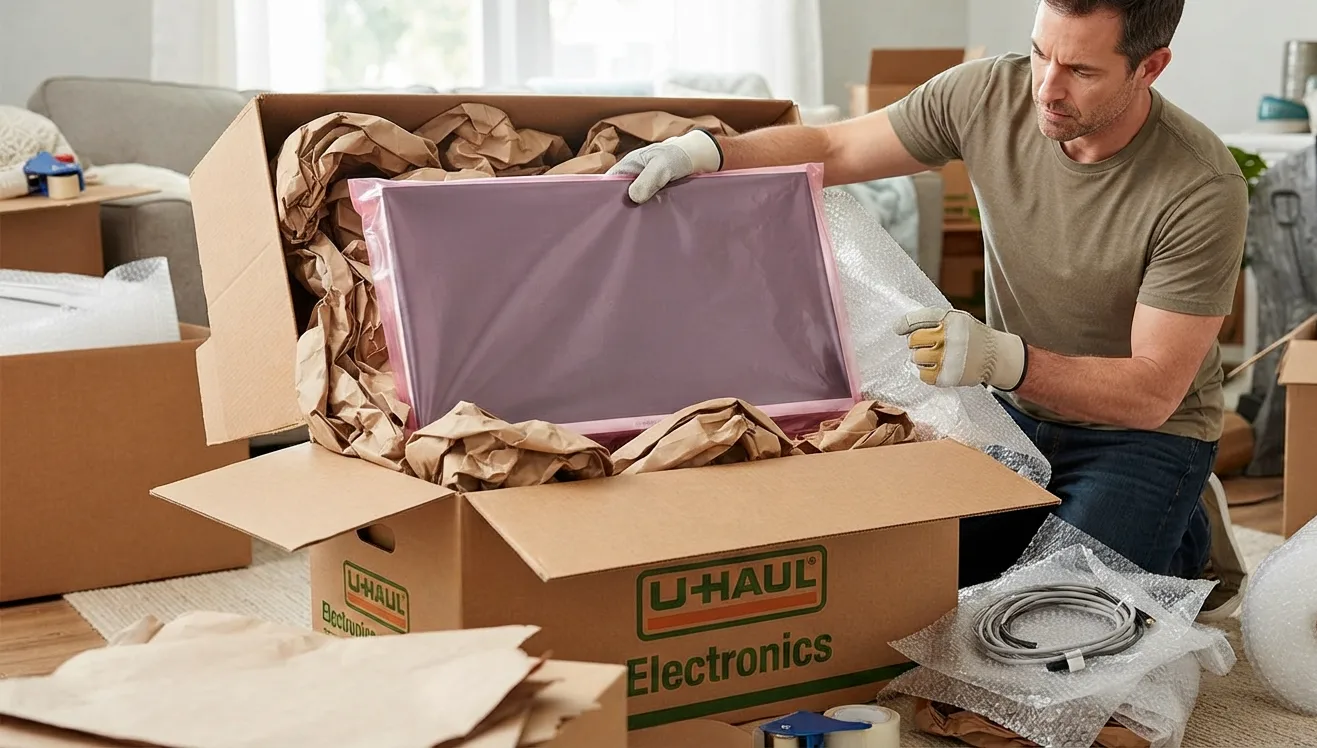
Cover TV and computer monitor screens with packing paper first, followed by anti-static bubble wrap with bubble side outwards from the screen. This anti-static wrapping is needed because the regular plastic wrap may accumulate static charge that may cause electrostatic discharge to the internal circuit boards.
Protect your motherboard and any other circuit board components inside a desktop tower, as electrostatic discharge will not produce any visible damage to these components but still can destroy them. In case you do not have anti-static wrap, cotton sheet or blanket may be used as an alternative for the short move.
- Step 6: Use Original Packaging When Possible
Use original packaging, if you kept it when unpacking your device, as it is created specifically for protection from physical impact of the device in transit. In case you do not have original packaging, use heavy-duty box that will fit the device just right and fill the remaining space with packing paper or foam inserts.
A box that does not fit tightly is even more dangerous in comparison with no box, as device may be moving inside such box and take an impact from inside.
- Step 7: Pack Boxes and Load the Truck Correctly
Securely seal each box and label it with the name of the device written in your permanent marker; instead of writing “Electronics,” for instance, write “Desktop Tower, Home Office.” Load the electronics upright, never sideways or upside-down, and don’t place anything heavy above them.
Electronics must be loaded in a place of the truck where they won’t move around much, preferably leaning against a wall or amidst other soft objects such as bedding. Don’t place electronics next to large, heavy pieces of furniture. If a box is squished or moves a lot during loading, stop what you’re doing and check its contents first.
Special Situations
Should You Wrap Every Piece Individually?
It is simple to pack routers and modems because of their lightness; however, don’t load them in places with strong magnets and speakers due to the possibility of some parts being affected by magnetic fields in the long term. Wrap the device in packing paper and loosely coil all cables together and tie them with a zip tie before placing them in a box.
Should You Wrap Every Piece Individually?
The big electronic devices to transport are large TVs; however, transporting them is the most complicated part of moving electronics when you lack professional equipment. The ideal situation would be to transport them in their original box, but if you don’t have that anymore, then you can use another box that is slightly bigger than the screen and transport it upright rather than flat.
Never place a big screen on a flat surface among other things because even a slight weight put in the wrong place will damage the screen. In case one does not have enough confidence moving such a valuable device, this is a good reason to leave it for the professionals to move.
Packing Older or Vintage Electronics
Old electronic appliances tend to be fragile inside compared to their new counterparts even though externally they might look quite solid. Older equipment needs additional cushioning and care in terms of the temperature, as old parts are prone to abrupt changes in temperature conditions.
Common Mistakes to Avoid
- Not backing up data before the move
- Packing equipment while it is still hot
- Using normal plastic wrap instead of anti-static
- Leaving cables unmarked and unmatched
- Placing boxes with heavy things above equipment
- Laying down a television screen during the move
- Packaging damaged or swollen batteries
These are the same mistakes that I have seen time after time having moved hundreds of families during my practice. They are absolutely free to avoid.
Professional Packing Tips
Pack the silverware near the end you’ll want a fork until the last possible minute. Set aside a small bag of everyday utensils for your essentials box so you’re not tearing open sealed boxes on night one in the new place.
If you’re moving more than one silverware set, number the boxes so you can confirm nothing’s missing later. And keep your bundles consistent four to six pieces each so unpacking feels organized instead of like sorting a junk drawer.
When You Should Call Professional Movers
The use of DIY methods is efficient when it comes to electronics packaging for moving. There are some exceptions to this rule. When your home theater system, many fragile screens, or a long-distance relocation become a factor, it becomes much safer to rely on professional help.
Professional relocation companies will know how to pack your belongings to make sure that your valuable equipment will not be damaged during transportation. For example, Power Movers company has enough experience to help homeowners prevent property damage, get rid of physical exhaustion while moving something bulky, and save money on replacement of any item.
In case you don’t have enough time for packing your electronic equipment or feel unsure about doing it on your own, it is quite reasonable to ask for help.
Conclusion
Here is a list of simple recommendations you should follow when packing electronics. It includes such actions as data backup, powering everything off, protecting each device using a soft material, and placing them in an upright position to prevent any damage caused by the weight of other belongings. Follow the recommendations mentioned above and enjoy your electronics in the new place.
Whether you do all the packing yourself or you have people come in to do the entire thing, the aim remains the same, which is to ensure that your electronics arrive at their destination ready for use. Are you prepared to begin packing?

Article written by
Gary Williams founded Power Movers, a Houston moving company with more than 1,000 reviews. He spent 12 years with the Houston Police Department’s Central Division, where moving-company complaint calls were part of what pushed him to start the business. Power Movers has worked with Tesla, Lululemon, and the Houston Rodeo, and is featured in Forbes Advisor’s Best Moving Companies in Houston list.